Network (Wi-Fi, switching, gateway)
Coverage planning, VLAN separation, PoE budgeting and UISP links, all managed.
GNS CARE ─ managed service hub
Network, CCTV, door access and intercom on one monthly fee. We do not just sell the kit — we plan it, install it and run it, so you can get on with the business.
Unlike break-fix support: we pull device activity logs through the official UniFi API, send them encrypted to our own cloud platform and analyse them with a SIEM plus an AI platform we build ourselves — naming the devices that are about to fail, suggesting what to change, and swapping them before they actually die.
Monthly fee calculator
Enter your device counts and pick a tier to see the monthly fee.
Nothing of a type? Leave it at 0.
What we manage
One monthly fee, one team. You own the hardware; we keep it running.
Coverage planning, VLAN separation, PoE budgeting and UISP links, all managed.
Cameras, recorders, drive health and retention — you hear about it the moment recording stops.
Cards, PINs, phone unlock and video intercom: permissions, schedules and logs in one place.
Firewall rules, site-to-site VPN and outbound monitoring; the hardening add-on feeds device data into our SIEM and adds a monthly security audit report.
What makes us different
The traditional model replaces hardware once it breaks. Our own AI platform reads device telemetry, names the units about to fail, and swaps them first.
We read device activity logs through the official UniFi API — nothing to install on your network and no inbound ports to open.
Logs are encrypted in transit to our own cloud platform, where only authorised engineers can read them.
A SIEM correlates events and trends around the clock instead of firing single alerts, so odd behaviour surfaces immediately.
An AI platform we build and operate combines the SIEM correlations with each device’s long-term baseline. Anomalies surface on their own, so nobody has to inspect devices one by one.
The platform points at the devices about to fail and proposes what to change — repositioning an AP, separating high-traffic devices, or replacing a drive that is wearing out.
When a drive, power supply or link trends the wrong way we arrange the repair or the swap before the hardware dies — far less downtime than waiting for a dead unit.
What we cover
Each one stands alone. We assess first, then rank the work by risk.
Staff, guests, IoT and POS each get their own segment, so a breach in one cannot move sideways.
Segment rules, geo-blocking and IPS/IDS signatures on the UniFi gateway, with alerts reviewed on a schedule. On another brand of firewall we apply the equivalent rules its feature set supports.
Office, warehouse and shops join one private network, so cross-site systems never face the public internet.
Guests get their own network, with session limits, bandwidth caps and a terms-of-use page.
VPN and per-person accounts replace shared passwords, and access is revoked the day someone leaves.
Traffic, logins and device state recorded in one place and analysed continuously in our SIEM, with email or push alerts the moment something changes.
Risk and response
These are the issues that come up most often in small and mid-sized offices.
Guest phones sharing a segment with the till means a compromised guest device can reach internal systems. We split by purpose and restrict traffic between segments with firewall rules.
Wide-open ports, vendor admin pages still reachable from the internet, logins for people who left. We review each one and narrow what is exposed.
A shared TeamViewer or VPN login lets staff work from home, but cannot be taken back cleanly. Per-person accounts with an audit trail can be revoked one at a time.
Opening ports so a technician can work remotely leaves devices permanently exposed. We move access behind VPN or a central controller instead.
Without logs you cannot tell who signed in, or when. Once logging and alerts are on, you can at least answer "when did it start" and "where did it come from"; the hardening add-on adds a monthly security audit report for audit and compliance queries.
Included and not included
Both tiers cover the managed core; Complete adds a one-hour response commitment, a 24-hour hardware swap and on-site cover. The hardening add-on applies to either tier.
| What is included | GNS CARE Essential HK$800 /month from Remote | GNS CARE Complete HK$2,000 /month from SLA and swaps |
|---|---|---|
| Monitoring, updates and reporting | ||
| 24/7 remote monitoring and alerts | GNS CARE Essential Included | GNS CARE Complete Included |
| Firmware and security updates | GNS CARE Essential Included | GNS CARE Complete Included |
| Configuration backups | GNS CARE Essential Included | GNS CARE Complete Included |
| Monthly report | GNS CARE Essential Included | GNS CARE Complete Included |
| Network, CCTV, access and intercom all in scope | GNS CARE Essential Included | GNS CARE Complete Included |
| Support and response | ||
| Unlimited remote support | GNS CARE Essential Included | GNS CARE Complete Included |
| SLA response guarantee (within one hour) | GNS CARE Essential Not included | GNS CARE Complete Included |
| Emergency call-outs | GNS CARE Essential Not included | GNS CARE Complete Unlimited |
| Loan hardware and swap (within 24 hours) | GNS CARE Essential Not included | GNS CARE Complete Included |
| Quarterly review | GNS CARE Essential Not included | GNS CARE Complete Included |
| CCTV and storage | ||
| Drive health and retention checks | GNS CARE Essential Included | GNS CARE Complete Included |
| CCTV health monitoring | GNS CARE Essential Not included | GNS CARE Complete Included |
| Security hardening (add-on) | ||
| VLAN separation review | GNS CARE Essential Add-on | GNS CARE Complete Add-on |
| Firewall rule audit | GNS CARE Essential Add-on | GNS CARE Complete Add-on |
| Outbound connection monitoring | GNS CARE Essential Add-on | GNS CARE Complete Add-on |
| Monthly security audit (compliance) report | GNS CARE Essential Add-on | GNS CARE Complete Add-on |
Scope and contract
The monthly fee is priced per device endpoint (gateway, switch, AP, camera, recorder, access and Talk), with a minimum of HK$800/month on Essential and HK$2,000/month on Complete. You buy and own the hardware; warranties follow the manufacturer terms. Managed services run on a minimum 12-month term at a fixed monthly fee — no per-visit charges. Adding or removing devices is pro-rated on the next invoice, and the exact scope and SLA details (Complete: one-hour response, failed hardware swapped within 24 hours) are confirmed in writing on the quote.
From signing to live
From choosing a tier to your first device health and security report, usually within two to four weeks.
You pick Essential or Complete, adding security hardening if you want it. The monthly fee is priced per device endpoint with a minimum, and it is fixed once the contract is signed.
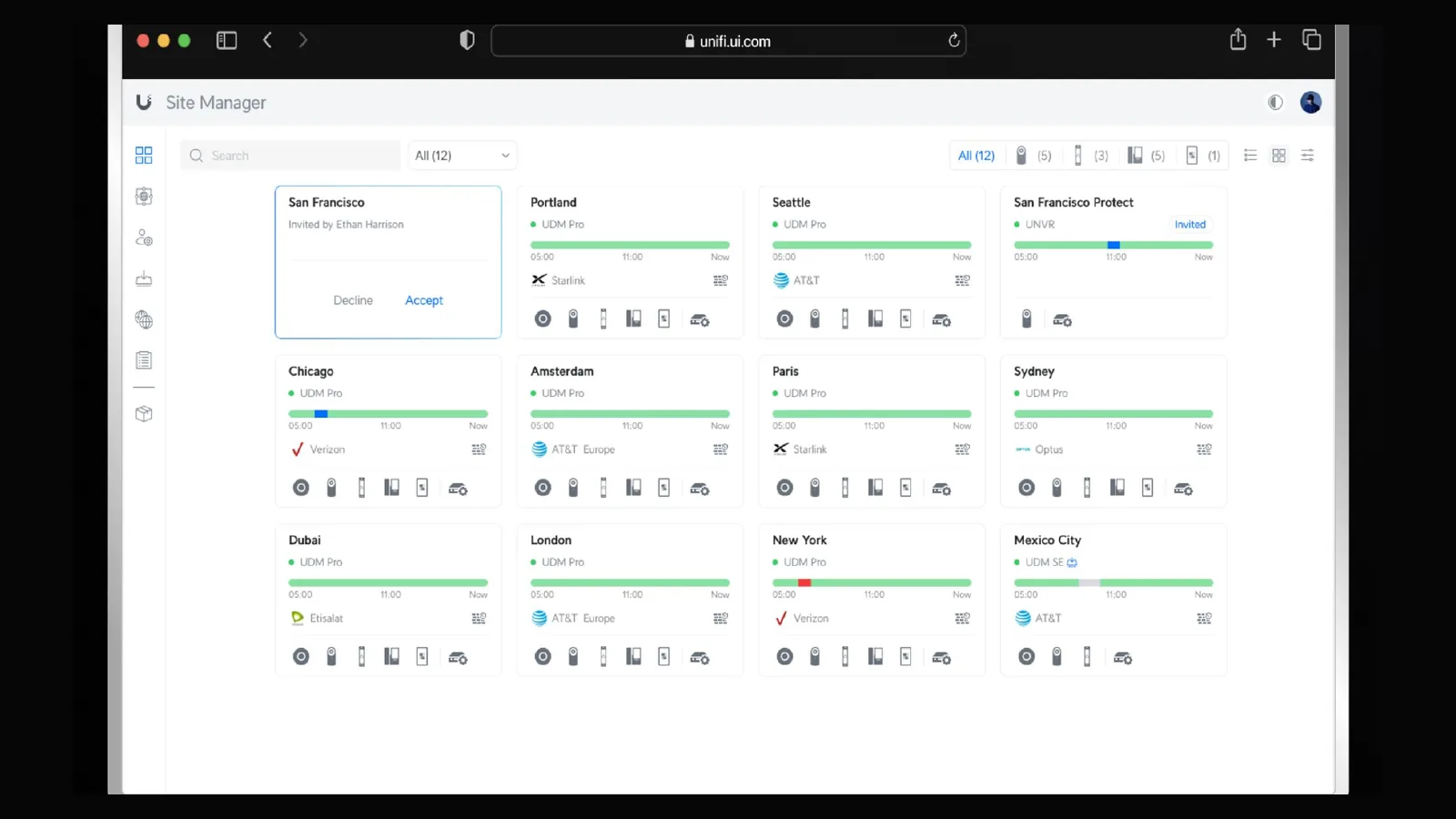
You invite the GNS account from UniFi Site Manager and confirm it — about ten minutes, with no software to install and no inbound ports to open. The six steps are shown with screenshots in the next section.
We check the device inventory against the agreed scope, record a health baseline for every endpoint, recorder and drive, and send a first report: existing risks, configuration issues, hardware that needs replacing and the order to handle them in.
We go through the report together, agree what to fix straight away and what moves into the managed service, and tune the alert thresholds and notification routes to how you actually work.
A report every month, plus tier-level follow-up on device health, incident handling, security updates and any replacement or re-tuning that needs a visit.
Access and onboarding
From request to approval the whole process takes about 10 minutes. You remain the owner of the devices and can revoke access at any time.
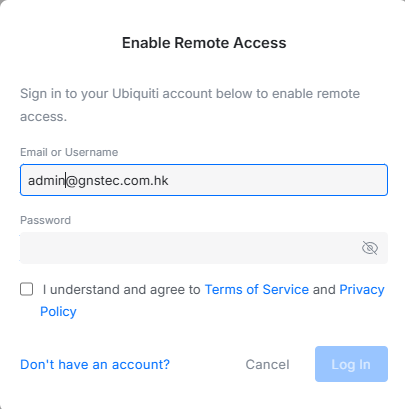
Sign in to UniFi Site Manager with your Ubiquiti account and turn on remote access. This is also the screen where you revoke access later.
In the fabric list on the left, choose "Create New" to make a fabric for this engagement.
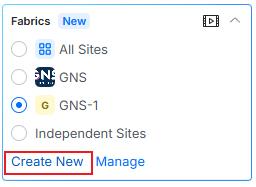
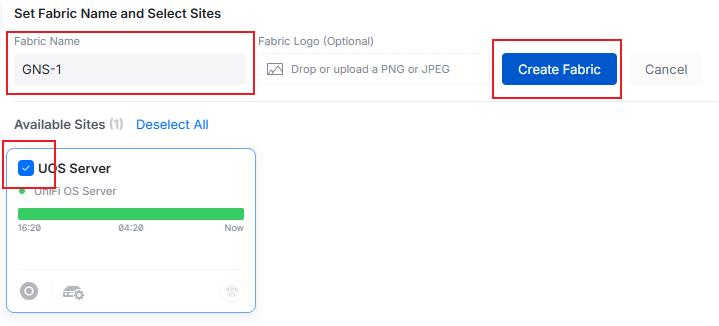
Enter a fabric name (for example GNS-1), tick the sites you want us to manage, then press "Create Fabric".
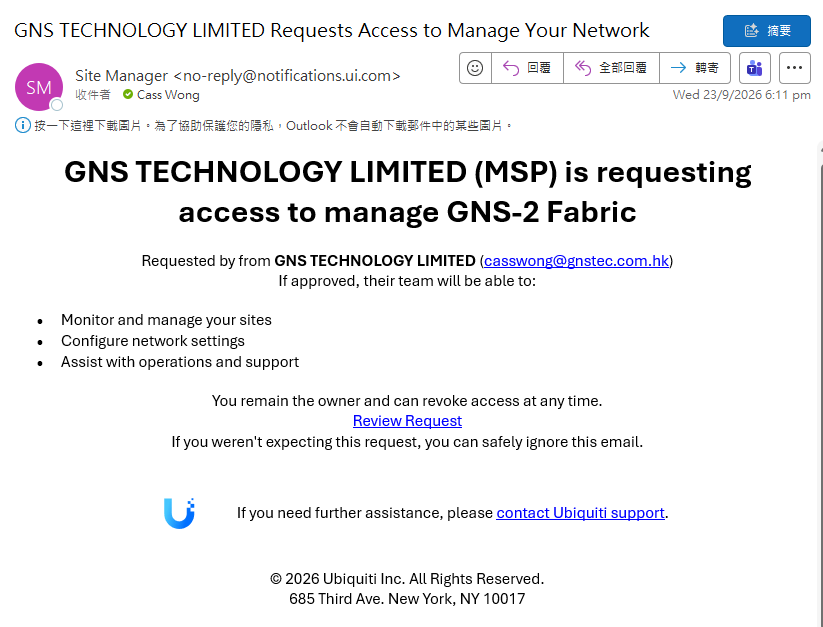
We request management access as your managed service provider. Ubiquiti emails you an official notice listing what we will be able to do: monitor and manage your sites, configure network settings, and assist with operations and support.
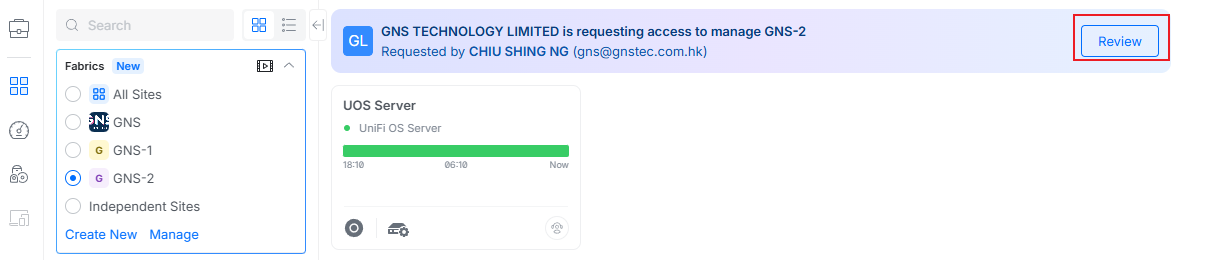
The same notice appears in UniFi Site Manager. Choose "Review" to see the request and who sent it.
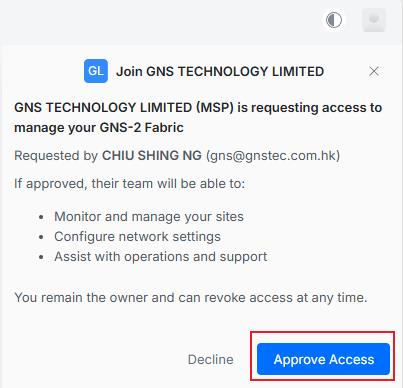
Confirm with "Approve Access" and we are in. You stay the owner of the devices and can revoke access from the same screen at any time.
Once approved, we do not rely on manual walk-rounds. GNS CARE reads your system through the official Ubiquiti API — device state, link quality, drive health and event history — and sends it, encrypted, to our cloud platform, where our own AI platform and SIEM analyse it continuously.
The technical whitepaper sets out the full architecture; frequently asked questions cover the rest, and project experience shows what we have delivered.
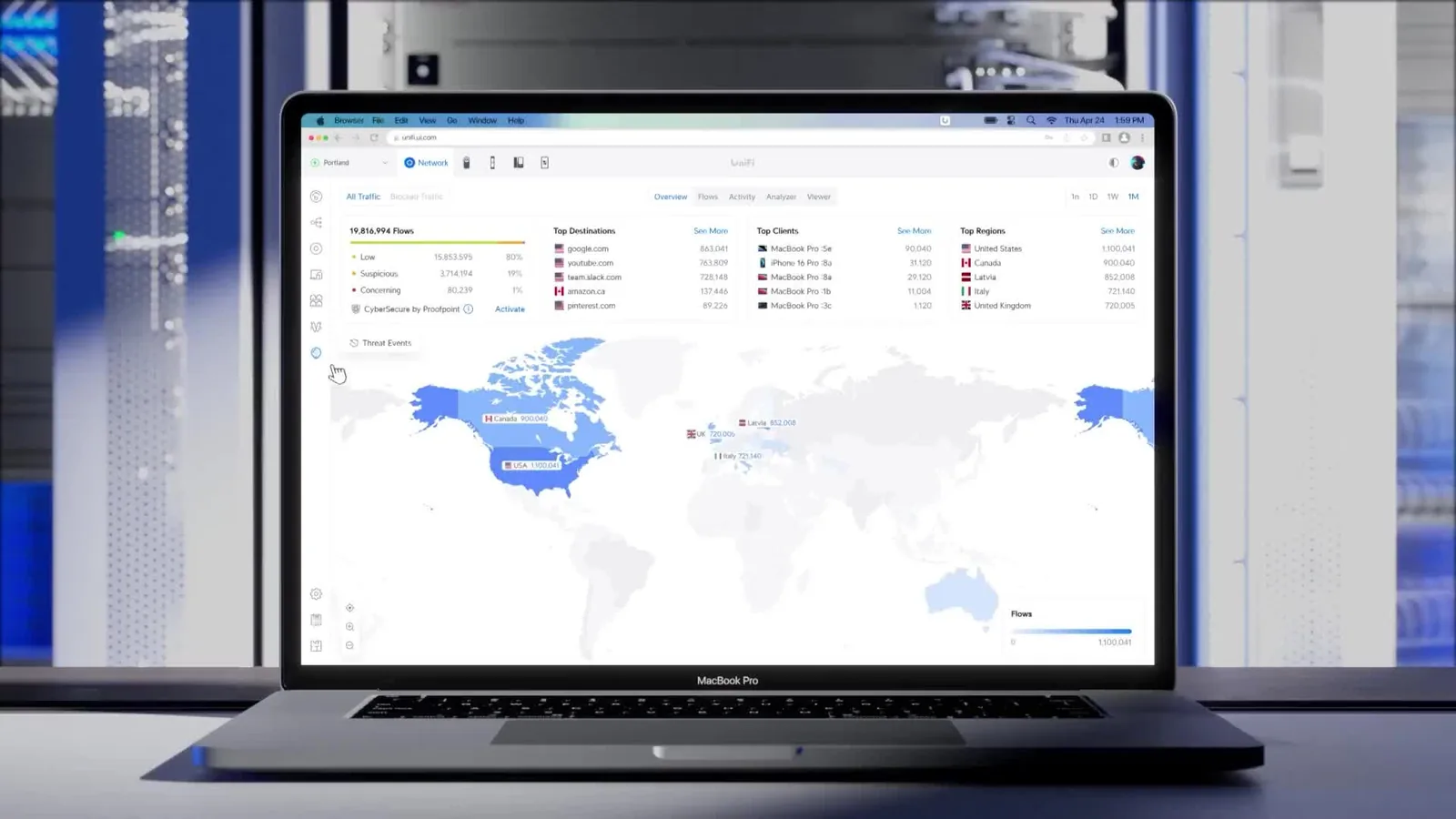
Management interface
GNS CARE reads the official UniFi API, so the device state, link quality and event history we see is the same as what you see in the UniFi Network interface -- there is no second, unauthorised monitoring stack.
The image shows the UniFi Network application's traffic view (Traffic / Flows), listing top destinations, clients and regions; we run the same data through our own AI platform for baseline comparison.
Official video
Official video for UniFi Network 10.6 (published 2026-09-01). Our managed service reads this platform's official API, then hands the data to our own AI platform for analysis.
GNS footage
A GNS video explaining how GNS Care managed services help you with 24/7 network monitoring, regular updates, remote support and a monthly health report — so you can focus on your business.
FAQ
These come up most often. Anything else, just get in touch.
It is priced per device endpoint: gateways, switches, APs, cameras, recorders, access and Talk each carry a monthly rate, with a minimum of HK$800/month on Essential and HK$2,000/month on Complete. The calculator above gives you an instant estimate; the final figure is confirmed in writing after the free site survey.
We pull device activity logs through the official UniFi API, encrypt them to our own cloud platform, correlate events in a SIEM and then analyse each device against its long-term baseline on an AI platform we build ourselves. There is no agent to install on your network and we hold management access only. The platform names the devices about to fail and suggests the fix, and we contact you to arrange the swap before the hardware dies.
A manufacturer warranty only reacts after hardware fails: you spot the fault, raise the case, wait for parts or an RMA, and carry the downtime — and it covers the hardware alone, not configuration, updates, backups or day-to-day support. GNS Care is a monthly managed service: we read device telemetry through the official UniFi API and watch it in a SIEM, so when a drive, a power supply or a link starts trending badly we arrange the repair or swap up front. It also covers firmware updates, configuration backups, alert handling and a monthly report; Complete adds a one-hour response SLA and a 24-hour replacement. You still own the hardware and the manufacturer warranty stays valid — the two are complementary.
Yes. Scope is counted per endpoint, so Protect CCTV on its own, or just the Wi-Fi, is fine — the fee follows the actual count.
You buy it and you own it; warranties follow the manufacturer terms. If your existing UniFi kit is still suitable we just take over management — no need to replace it.
Essential is remote management: 24/7 monitoring and alerts, firmware and security updates, configuration backups, unlimited remote support and a monthly report. Complete adds the one-hour response SLA, a 24-hour hardware swap, unlimited emergency call-outs, a quarterly review and CCTV health monitoring.
A flat HK$500 a month for a VLAN separation review, a firewall rule audit and outbound connection monitoring, with follow-up on anything we find and a note in the monthly report. UniFi devices that expose the official API also feed their operating data into our SIEM for continuous analysis, and any security issue raises a proactive alert. Each month you also get a security audit report covering device state, firewall rules and the alerts we handled, for your digital-compliance and audit needs.
For monitoring we hold device management access only, to read health status and alerts. Unless you ask us to deal with a specific incident we do not review recordings; reports show uptime, drive health and event logs.
We can manage other brands too. The difference is the AI prediction: the official UniFi API exposes each device's health and activity data, so prediction is most complete there. With another brand it depends on whether the vendor exposes an equivalent API — with no API exposed, the AI platform analysis cannot run, and that part falls back to remote monitoring, alerting, firmware follow-up and on-site support. We start with an assessment that sets out what is actually possible on your brand, then decide whether to keep it, change part of it, or replace it.
The contract rolls on month to month after the initial term, and you can end it with one month notice. Adding or removing devices is pro-rated on the next invoice — no need to re-sign.
We look at this from two angles: cost and stability. On cost, most commercial firewalls charge an annual or monthly licence to keep receiving updates, while UniFi firmware and feature updates are free and continuous, which is already a price advantage. Add the GNS AI managed platform (device data read through the official API, acted on before failure) and a team that has delivered projects for government departments, public bodies, schools and rail operators since 2019, and the long run is more stable and better value than the usual hardware-licence-plus-outsourced-maintenance combination.
Segments and rules are tested outside office hours first, and only applied once the tills, printers and shared folders are confirmed working. The cut-over happens in a window you choose.
Not necessarily. If your existing equipment — UniFi or another brand — supports what you need, we keep it and bring it under management. We only suggest replacing hardware when you need more throughput or threat management. If you keep another brand, the assessment sets out what that brand can actually do — with no API exposed, the AI platform prediction cannot run.
We provide a post-incident review, containment advice and a remediation plan, and can coordinate with your IT provider. Live incident response is a separate arrangement, but we will help you size the impact first.
Yes. You get a risk list with prioritised actions. Work through it yourself, or hand the items back to us one at a time.
Security does not end at handover: firmware and signatures update weekly, staff and devices change, and new vulnerabilities keep appearing. On a monthly plan we harden the network at handover and then keep monitoring, updating and following up. MSSP, backup and disaster recovery, and IT support can be added item by item.
Either way works. Most clients let us supply the access points, switches and gateways so warranty, licensing and configuration stay in one place, but we will configure equipment you already own if it fits the design.
Yes. Ceiling and trunking work is usually done outside business hours, with the noisy stages scheduled for evenings or weekends. Network cutover is planned for a window you choose.
The survey is free within Hong Kong Island, Kowloon and the New Territories, and there is no obligation to proceed. You keep the findings either way.
Our on-site service covers all of Hong Kong — Hong Kong Island, Kowloon and the New Territories. Outlying islands and remote locations are quoted individually because of travel time.
Contact us for a free check: we review how your current devices are actually running, then arrange a one-month free trial.